Guide 04 / 50 · Removal & correction
An Article Was Removed, but It Still Appears on Google: What Next?
Sometimes the publisher has already changed or removed a page, while Google still shows an older title, snippet, or cached result. The next step is to verify the source and request an update where appropriate.

Check the live source first
Open the exact result URL. Does it now return a missing-page response, or has the relevant text actually been removed? If the content remains, a refresh request will not solve the underlying issue. Record what the page currently shows and the date you checked it.
Use the matching Google process
Google's Refresh Outdated Content tool is designed for cases where a page or image has changed or no longer exists but Search has not caught up. Submit the precise result URL and follow the tool's instructions. It is not a way to remove accurate content still present on the source page.
Verify the final appearance
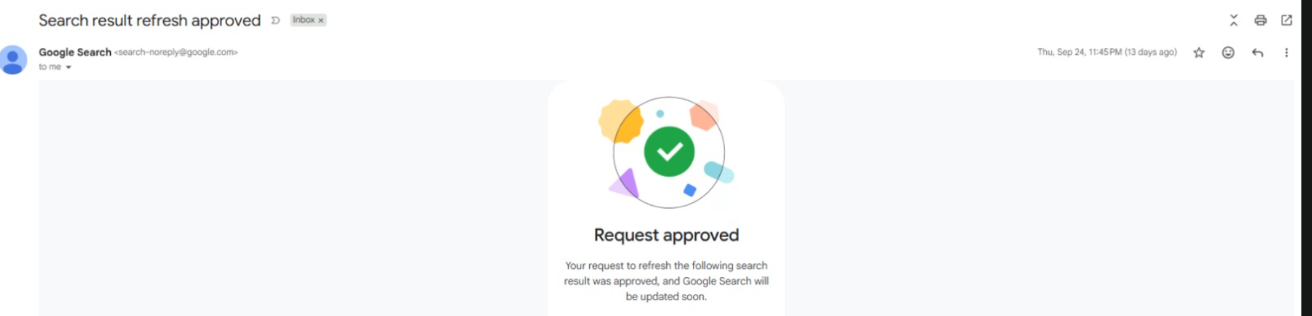
An approval message confirms a refresh request was accepted. It does not, by itself, establish that the original page was deleted or that every search result has updated. Check the relevant searches again and document the outcome separately.
How to record the result
Take one screenshot of the changed publisher page and another of the old search result, with dates. After a refresh approval, repeat the same search and capture the new appearance. This before-and-after record supports a narrow, honest claim about what changed without implying the whole internet has been cleared.
Take action
A practical checklist
- Open the exact URL to confirm the page is gone or materially changed.
- Capture the current source and old result with dates.
- Submit the relevant URL through Google's outdated-content process.
- Save the request status without treating approval as final proof.
- Recheck agreed queries and image results after Search changes.
Illustrative example
How this can play out
A publication removes a page on Monday, but Google still shows its old headline on Wednesday. The source URL now returns a missing-page response. That is the kind of gap a refresh request addresses. If the article still loads with the same text, the request does not solve the source problem.
This is a hypothetical illustration, not a client case or a claimed FAMA Bureau result.
Questions people ask
Questions and limits
Does 'request approved' mean the page was deleted?
It means Google approved the refresh request. Verify the source URL and current search result separately before describing the outcome.
How long will every result take?
Timing varies by crawling and processing. Set a review date and document what remains; do not treat one approved request as a web-wide removal.
In brief
Track three states separately: what the source page shows, whether a refresh request was approved, and what Search now displays.
Official guidance
These guides provide general information. Publisher, platform, search-engine and legal decisions depend on the facts of each matter. Where legal advice is needed, consult a qualified independent professional.
A private next step
Discuss your situation.
Share a brief outline. Please do not send identity documents, passwords or sensitive case files through the enquiry form.